 Just about everybody in our community has heard of emulation as an alternative preservation strategy to migration. But emulation is mostly talked about -- and in terms that are not very encouraging: emulation is rumoured to be very difficult to do, to require lots of expert knowledge and to be really expensive. On 26-27 October the road show of the European KEEP project came to the KB in The Hague and some 45 attendees were given the opportunity to learn more about emulation and test the tools developed by KEEP.
The resulting workshop (led by Jeffrey van der Hoeven, KB, at right) was very much worthwhile and enjoyable, with almost the entire KEEP project team sharing its knowledge. For all those interested in the deep technical details, I refer you to the KEEP website where all the slides will appear soon. For those of you who would like a broader overview, here are my experiences from the last few days (with a selection of slides from the presenters; thanks, KEEP team, for allowing me to use those).

The audience included representatives from libraries, archives, a technical university, two The Hague-based criminal courts, a criminal information service, a film museum and a museum for media art.
What emulation is
In my general introduction to the workshop (what is the problem, etc.), I gave a definition for dummies that was not contested by the experts in the room, so I dare repeat it here. Our problem is that digital objects really only work on the hardware/software combination on which they were made. But these platforms change quickly. Migration is a strategy whereby you change the digital object to make it run on a newer platform. In the long term this is risky, because migrations are never 100%. There are always little changes. Until one day the object no longer is what it is supposed to be. Plus: it only works for a limited number of relatively simple file formats (text, images).
An alternative is emulation. You leave the digital object as it is, but you build software to make the new hardware/software combination pretend it is the old combination.

One can imagine this requires a lot of technical expertise about the old platform and the new platform and this for every possible file format around, of which there are thousands, plus all the dependencies within more complex objects such as websites.

Hence, it does not seem very practical. But when it works, you get a more authentic look and feel than with migration. Two participants in the project come from the computer game industry (Computer Spielemuseum and the European Games Developer Federation, EGDF), where look and feel is everything. Quite a few single emulator programmes have been developed already and new ones are developed all the time. But these are just pieces of the puzzle.
Emulation according to KEEP in four basic steps
Bram Lohman of Tessella summed up emulation according to KEEP in four basic steps, and I will let his slides speak for themselves:


The KEEP approach
The KEEP project wants to make emulation more practical by building a number of black boxes that take care of the most technical aspects of emulation; in this slide they are the green boxes.

- The Transfer Tools Framework is your assistant during the ingest phase. It helps you get content from different media (floppy disk, cd-rom, cassette, etc.) and store it into your digital archive.
- At the access stage, there is the Emulation Framework, that analyses the digital object, finds the proper emulator software and delivers everything you need to run the object in a new computer environment.
- The last building block is the KEEP Virtual Machine. This is the most daring goal of the project, and you can see in the slide that it is only pencilled in for now. Emulators themselves are pieces of software which become obsolete as hardware platforms change. The KEEP Virtual Machine is a piece of software that is so basic and universal that it will ‘port’ into many hardware platforms and thus make emulator software much less prone to technology changes. This is the ‘portability’ part of the KEEP acronym.
A special component of the Emulation Framework is TOTEM, which helps users find technical information about the digital object to be emulated in various available databases such as PRONOM (see earlier post):

What emerged from the workshop
The attendees at the workshop were impressed by the work of the KEEP project. Jacob Taekema of the Amsterdam Municipal Archives (previously Rotterdam) concluded at the end of the two-day event that he could now see emulation developing into a really viable option. Aminata Kpewa and her colleagues of the Special Court of Sierra Leone were really happy to discover a network of people and a tool framework that could finally help them sort out the mess of obsolete databases in their archives.
The important accomplishment of the KEEP approach is that it takes care of a lot of the most technical, expert work (finding the best emulator, configuring the original environment), thus making emulation more accessible for less technically expert staff. The good news is also that the framework can be included into any existing preservation solution – Safety Deposit Box producer Tessella is one of the partners in the project. In addition, all of the work of KEEP is available in open source.

Representatives of the KEEP team discussing archival problems with representatives of the Special Court for Sierra Leone – and making plans for on-site help.
But the KEEP team itself readily admits that much, much work still needs to be done:
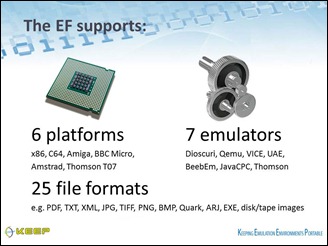 The framework now works for a limited number of platforms and file formats (slide at right), and, obviously, many more should be added to really make the framework practicable. As yet the framework cannot yet handle complex objects, although the emulation strategy is considered the most promising for those. It is a matter of finding the resources to put in lots of more R&D work.
 - At the ingest point (the tool transfer framework), the approach still depends on the availability of all sorts of old hardware to read obsolescent media carriers (floppy disks, tapes, etc.). Such devices are being collected by private individuals and sometimes by computer museums, but it was suggested that perhaps we need a more structured approach to safeguarding these essential machines and the knowledge about how to use them (nationally, perhaps, such as within the Dutch Digital Preservation Coalition?)
- Whoever wants to work with an emulated object will have to know how that programme worked, what the commands were, etc. Thus we need to collect and keep as many manuals and specifications as possible. KEEP is building a knowledge base.
- The KEEP project itself will end in February 2012. But much work still needs to be done. The KEEP team are doing everything they can to transfer the project to an organization such as the Open Planets Foundation (OPF), which can continue to develop the approach. Let us hope that this transfer is successful and more resources will become available to develop emulation as a strategy, e.g. from the European Community.

Digital preservation stumbling block: copyright law
A major stumbling block for KEEP project, for emulation, and, indeed, for all of digital preservation, is copyright legislation. David Anderson of the University of Portsmouth took upon himself the ungrateful task of finding out about possible legal constraints, and, unfortunately, he found (too) many. In fact, the deliverables of the KEEP project itself will be handed over to the European Commission in loose components because of copyright restrictions. Which is, when you come to think of it, pretty ridiculous. I will write a separate blog post about this important subject and David’s work soon.
More KEEP workshops planned
If this post has wetted your appetite for emulation, you are most welcome to attend one of the forthcoming KEEP national workshops: 10 November Zagreb, 29 November Rome, 24 January Cardiff. Details on the website.

Alexander Fernandez on behalf of the European Games Developer Federation EGDF: ‘Involve game developers in preserving their work and building the emulation knowledge base.’
(For those who question the need to preserve games: they are part of our cultural heritage and they play a growing role in education. Plus: there is a keen and creative community out there developing those games, and they may well help projects such as KEEP to develop means to preserve other complex objects.)
PS: Not to complicate matters too much, and also because it was not mentioned during the workshop, I did not speak, in this blog post, of a third preservation strategy emerging from the CASPAR project, the ‘representation information network’; everything about that in an earlier post.


